.png)
To explore how Wayfinder addresses these challenges through its versioned packages, let's first understand the fundamentals of creating a package in Wayfinder.
Wayfinder provides versioned packages as a secure and consistent delivery method for bootstrapping clusters with software using cluster plans.
In Wayfinder, packages provide a delivery method for bootstrapping multiple clusters with software. Wayfinder offers versioned packages that include generic configuration that can be automatically tailored for all the specific environments that development teams can create.
To ensure that your versioned package is created correctly, you need to:
Cluster plans in Wayfinder serve as versioned blueprints for creating one or more clusters. Each cluster plan version outlines the cluster's configuration which includes the cluster's network and the versioned packages that'll be deployed to each cluster created with a particular version of the cluster plan.
Next, we'll explore how Wayfinder’s versioned packages address the IAM challenges highlighted in our previous blog article.
Appvia Wayfinder indirectly addresses IAM policy management challenges by using versioned packages to ensure predictable releases, central management, efficient change propagation, dependency management, auditing, compliance, context adaptation, validation coverage, interoperability, and team coordination, thereby streamlining secure and consistent deployments across multiple clusters and environments.
In our exploration of IAM policy management challenges, we've highlighted several complexities faced by organisations managing policies across multiple tenants. Appvia Wayfinder addresses these challenges indirectly through its innovative use of versioned packages:
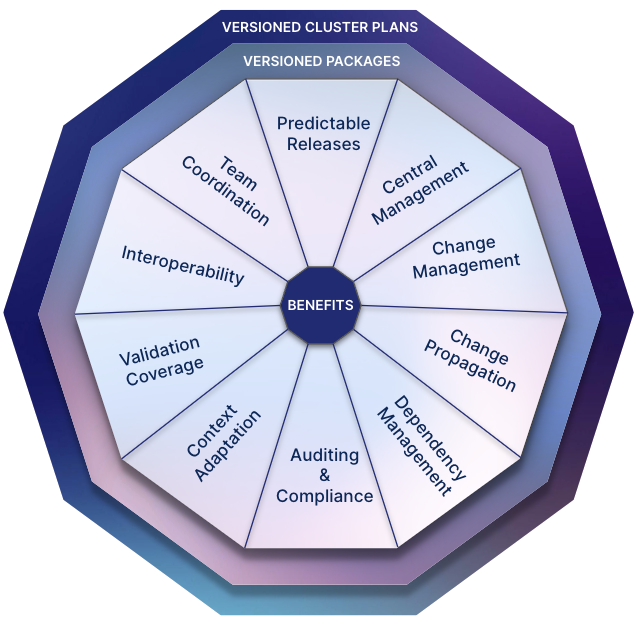
Predictable Releases
Central Management
Change Management
Change Propagation
Dependency Management
Auditing and Compliance
Context Adaptation
Validation Coverage
Interoperability
Team Coordination
From these insights, it's clear that while Wayfinder doesn’t directly manage all IAM Policy Management challenges, it does offer robust solutions to address related challenges when deploying packages with the context-specific IAM policy required to bootstrap clusters.
Let's illustrate this in practice with ExternalDNS as an example, demonstrating how it can be used to bootstrap a cluster using the ExternalDNS package.
An organisation hosting multiple tenants on a multi-cloud environment (AWS, Azure, and GCP) faces challenges in granting the workload identity the proper permissions needed for ExternalDNS to function. ExternalDNS manages DNS records for Kubernetes resources by dynamically updating DNS providers (like Route 53, Azure DNS, and Cloud DNS) based on changes in the Kubernetes cluster. Ensuring security and isolation while managing these permissions across different cloud providers is essential.
The primary challenge is to provide tenants with cloud-specific DNS resolution for their Kubernetes clusters while maintaining strict security and isolation. The platform engineering team requires a centralised approach to manage ExternalDNS configurations across multiple clouds, minimising the overhead of managing permissions to the workload identity. Key challenges include:
By addressing these challenges, the organisation aims to simplify the management of ExternalDNS permissions and configurations across its multi-cloud infrastructure, ensuring secure and efficient DNS resolution for all tenants.
Wayfinder offers a centralised platform for maintaining the entire lifecycle of a package like ExternalDNS. It manages multiple versions of packages, enabling you to centrally update the latest version and manage package updates without disruption. Workload identities are configured on a per-package basis and across clouds as needed. Wayfinder uses familiar tools like the Go templating language, allowing you to utilise a comprehensive set of Wayfinder variables to resolve values based on the context, such as cloud provider and cluster name.
Steps to Bootstrap a Cluster with the ExternalDNS Package:
By following these steps, you can efficiently manage and deploy the ExternalDNS package across multiple clouds while ensuring proper permissions, security, and compliance.
In the next section, we provide a practical example of how to bootstrap cross-cloud clusters with the ExternalDNS package.
This section illustrates how to bootstrap cross-cloud clusters with the ExternalDNS package using Wayfinder. Wayfinder allows you to create versioned packages using its CLI or Web Interface. For newcomers, starting with the Web Interface helps in understanding Wayfinder concepts and the structure of Wayfinder package YAML files.
Follow the steps below to create a Wayfinder Package for ExternalDNS using Wayfinder's Web Interface and CLI.
Version: "2012-10-17"
Statement:
{{- if .Cluster.DNSZones }}
- Sid: "AllowRoute53ChangeResourceRecordSets"
  Effect: "Allow"
  Action:
  - "route53:ChangeResourceRecordSets"
  Resource:
  {{- range .Cluster.DNSZones }}
  {{- if .AWS }}
  - "arn:aws:route53:::{{ trimPrefix "/" .ZoneID }}"
  {{- end }}
  {{- end }}
{{- end }}
# must always have a valid role for the workload identity to work
- Sid: "AllowRoute53List"
  Effect: "Allow"
  Action:
  - "route53:GetChange"
  - "route53:ListHostedZones"
  - "route53:ListResourceRecordSets"
  - "route53:ListHostedZonesByName"
  Resource:
  - "*"
# must always have a valid role for the workload identity to work
- scope: /subscriptions/{{ .CloudAccessConfig.Azure.Subscription }}
  roleDefinitionName: Reader
{{- if .Cluster.DNSZones }}
  {{- range .Cluster.DNSZones }}
    {{- if not .Private }}
- scope: {{ .ZoneID }}
  roleDefinitionName: Contributor
    {{- end }}
  {{- end }}
{{- end }}
# must always have a valid role for the workload identity to
work
- role: roles/dns.reader
  scopeType: Project
{{- if .Cluster.DNSZones }}
  {{- range .Cluster.DNSZones }}
    {{- if .GCP }}
- role: roles/dns.admin
  scopeType: Project
    {{- end }}
  {{- end }}
{{- end }}
Include any necessary Helm chart configurations.
domainFilters:
{{- range .Cluster.DNSZones }}
- {{ .Domain }}
{{- end }}
fullnameOverride: external-dns
logFormat: json
policy: sync
txtOwnerId: {{ .Cluster.Name }}
replicas: 2
crd:
  create: false
metrics:
  enabled: true
  serviceMonitor:
    enabled: false
rbac:
  apiVersion: v1
resources:
  limits:
    cpu: 20m
    memory: 50Mi
  requests:
    cpu: 10m
    memory: 50Mi
serviceAccount:
  create: true
  name: {{ .Package.WorkloadIdentity.ServiceAccountName }}
  annotations:
{{ .Package.WorkloadIdentity.ServiceAccountAnnotations | toYaml | indent 4 }}
podLabels:
{{ .Package.WorkloadIdentity.PodLabels | toYaml | indent 2 }}

{{- if .Cluster.AWS }}
provider: aws
aws:
  region: {{ .Cluster.Region }}
{{- end }}
{{- $resGrp := "" }}
{{- range .Cluster.DNSZones }}
  {{- if not .Private }}
    {{- $resGrp = .Azure.ResourceGroup }}
  {{- end }}
{{- end }}
{{- if $resGrp }}
provider: azure
azure:
  tenantId: {{ .CloudAccessConfig.Azure.Tenant }}
  subscriptionId: {{ .CloudAccessConfig.Azure.Subscription }}
  useWorkloadIdentityExtension: true
  resourceGroup: {{ $resGrp }}
{{- end }}
{{- if .Cluster.GCP }}
provider: google
{{- end }}
Validate the package configuration on a test cluster using Wayfinder’s `wf validate package` command. In the following example the validation fails as Wayfinder detected that the Service Account specified in the template doesn’t exist in the cloud and that you haven’t specified that it should be created.

Following these steps enables efficient management and deployment of the ExternalDNS package across multiple clouds using Wayfinder, effectively addressing IAM challenges discussed earlier in this article.
Appvia Wayfinder provides a robust and efficient solution for managing IAM-related challenges through the use of versioned packages. By offering a centralised platform for package creation, configuration, and management, Wayfinder helps streamline the process of bootstrapping clusters with essential services like ExternalDNS. It addresses critical IAM challenges such as central management, change propagation, and dependency management.
Through its use of familiar tools like the Go templating language and a focus on validation and managed versions, Wayfinder ensures secure, compliant, and consistent deployment of packages across multi-cloud environments. This approach not only simplifies IAM management but also enhances overall operational efficiency and security.
Appvia Wayfinder provides a centralised platform for creating, managing, and deploying cluster capabilities as versioned Wayfinder packages. This centralisation helps maintain consistency and security across multiple clusters and cloud environments.
Wayfinder indirectly addresses several IAM management challenges, including central management, change propagation, and dependency management. It ensures that IAM policies and permissions are consistently applied and managed across different environments.
By leveraging familiar tools like the Go templating language and focusing on validation and version control, Wayfinder facilitates efficient and secure deployment of Wayfinder packages. This approach minimises the risk of misconfiguration and enhances operational efficiency and security.